

 Nederlandse versie
 Search
 About me
 Follow me at Facebook
 Follow me at Instagram
 View portfolio at 500px
 Respond via email
 Share on Twitter
TscExcelExport
Version 4.43
December 2023
Delphi
VCL
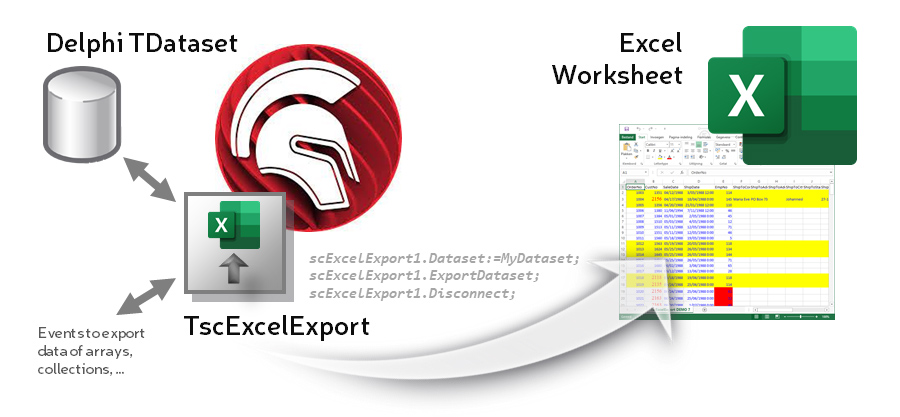
This TscExcelExport component is an advanced, powerful but easy to use component which enables you to export all records of a dataset from Embarcadero Delphi to Microsoft Excel. Many features are provided to change the layout, use conditional formatting, to add totals, to create groups, to set a filter, ... The component works in Delphi 5, 6, 7, 2006, 2007, 2009, 2010, XE, XE2, XE3, XE4, XE5, XE6, XE7, XE8, 10 Seattle, 10.1 Berlin, 10.2 Tokyo, 10.3 Rio, 10.4 Sydney, 11 Alexandria and 12 Athens and it supports all Excel versions from 97 to 2019.
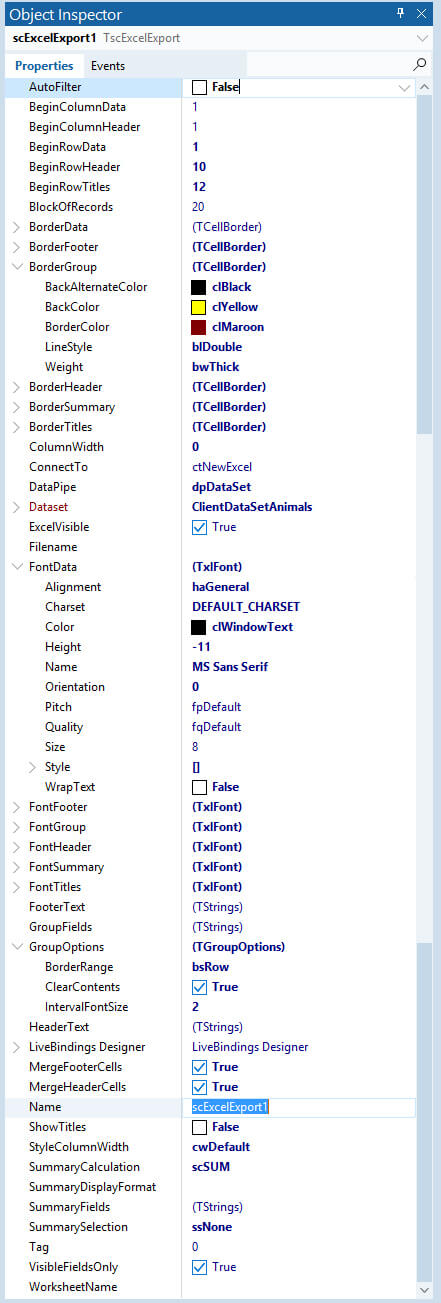 |
FeaturesPropertiesAll kinds of settings to modify the layout of the worksheet are provided.
Events
Methods
Component editor
Live templates
|
Info
Type library / OCX / COM
- This ExcelExport component uses the Office server components from the Embarcadero COM type library to implement OLE automation with Excel.
- By using compiler directives (in unit scExcelExportConfig.inc) you can override the default type library. The available libraries are Excel97, Excel2000, ExcelXP and Excel2010.
- Microsoft Excel should be installed on the PC when using this component.
Delphi / Office
-
This VCL component was tested in
- Borland Delphi 5 (SP1)
- Borland Delphi 6
- Borland Delphi 7
- Borland Delphi (BDS) 2005
- Borland Delphi (BDS) 2006
- CodeGear Turbo Delphi
- CodeGear Delphi 2007
- CodeGear Delphi 2009
- Embarcadero Delphi 2010
- Embarcadero Delphi XE
- Embarcadero Delphi XE2
- Embarcadero Delphi XE3
- Embarcadero Delphi XE4
- Embarcadero Delphi XE5
- Embarcadero Delphi XE6
- Embarcadero Delphi XE7
- Embarcadero Delphi XE8
- Embarcadero Delphi 10 Seattle
- Embarcadero Delphi 10.1 Berlin
- Embarcadero Delphi 10.2 Tokyo
- Embarcadero Delphi 10.3 Rio & Community Edition
- Embarcadero Delphi 10.4 Sydney
- Embarcadero Delphi 11 Alexandria
-
This ExcelExport component works with
- Microsoft Excel 97
- Microsoft Excel 2000
- Microsoft Excel XP
- Microsoft Excel 2003
- Microsoft Excel 2007
- Microsoft Excel 2010
- Microsoft Excel 2013
- Microsoft Excel 2016
- Microsoft Excel 2019
- Microsoft Excel 365
- It has been tested with Dutch and some English Office versions.
- It will also give you access to the Excel Application, Workbook and Worksheet objects so you can access all VBA properties and methods.
Demo application
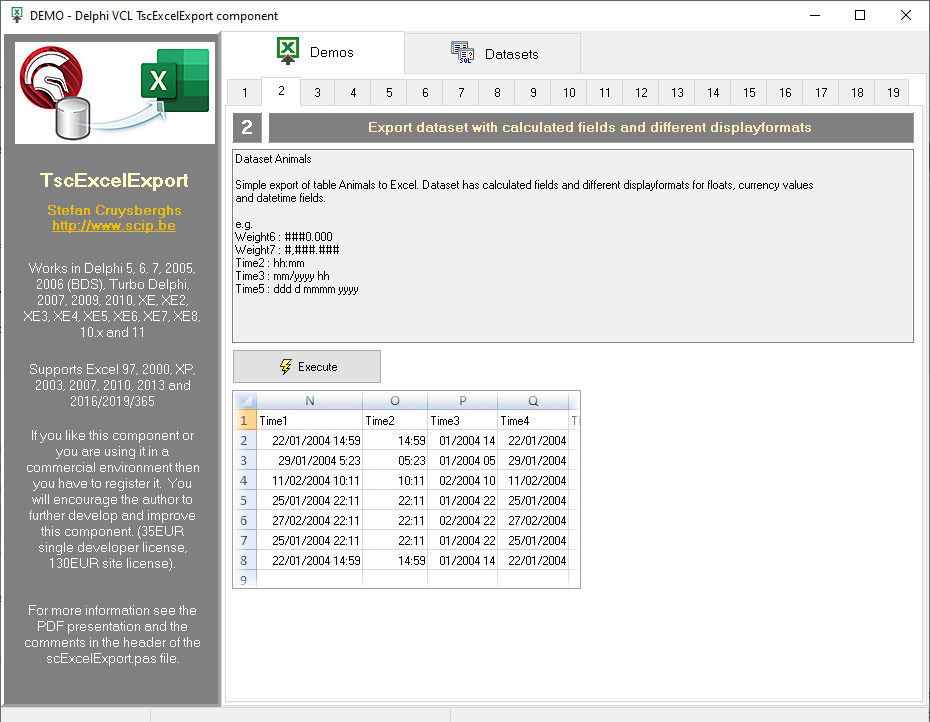
- A full demo application with 18 examples is provided to test all features of the component (and Excel automation).
- The project file and source code is located in the Source demo folder. The executable DemoExcelExport.exe is also included in this folder.
Installation
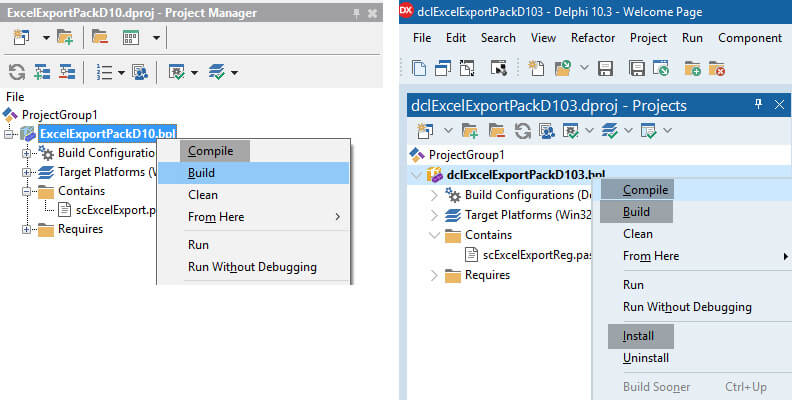
- Step 1: Open the run-time package ExcelExportPack5.dpk (for Delphi5), ExcelExportPack6.dpk (for Delphi6) ExcelExportPack7.dpk (for Delphi7), ExcelExportPack9.dpk (for Delphi 2005), ExcelExportPack10.dproj (for Delphi 2006 and Turbo Delphi), ExcelExportPack11.dproj (for Delphi 2007), ExcelExportPack12.dproj (for Delphi 2009), ExcelExportPack14.dproj (for Delphi 2010), ExcelExportPackXE.dproj (for Delphi XE), ExcelExportPackXE2.dproj (for Delphi XE2), ..., ExcelExportPackXE10.dproj (for Delphi XE10), ExcelExportPackD10.dproj (for Delphi 10 Seattle), ExcelExportPackD101.dproj (for Delphi 10.1 Berlin), ExcelExportPackD102.dproj (for Delphi 10.2 Tokyo), ExcelExportPackD103.dproj (for Delphi 10.3 Rio and Community Edition) and ExcelExportPackD104.dproj (for Delphi 10.4 Sydney). Compile or Build the package.
- Step 2: Open the design-time package dclExcelExportPackx.dproj and Compile or Build it
- Step 3: Install it. The Install option is only available in the context popup menu when you right click
- The TscExcelExport component will appear in the tabsheet SC of the component palette.
- When you like to add the component to an existing package, make sure the DCP file dclOffice which can be found in the Delphi/Lib folder is added as "required". When creating a new design-time package, the DCP file designide.dcp should be added.
Technical info
- See header of unit scExcelExport.pas for more information about all properties, methods, events, ...
- Documentation, release notes and examples about the Delphi TscExcelExport component (in PDF format) (3,6 Mb)
Screenshots
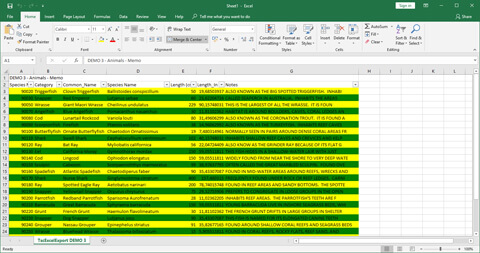
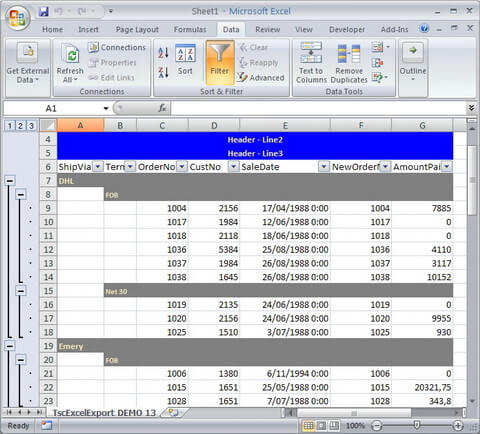
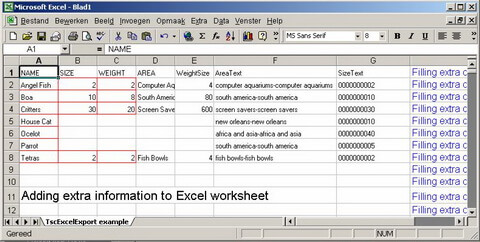
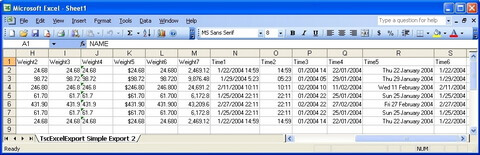
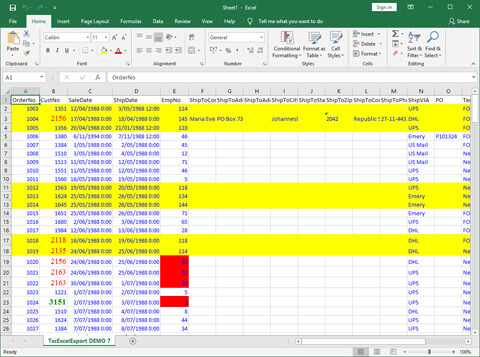
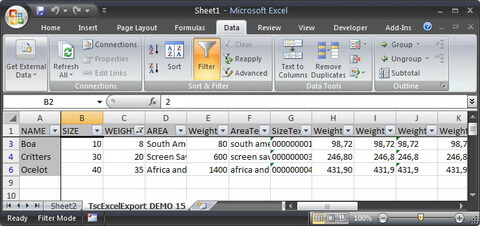
Delphi examples
Example 1 : easiest way to export/write/copy dataset to Excel
scExcelExport1.Dataset:=Table1;
scExcelExport1.ExportDataset;
scExcelExport1.Disconnect;
Example 2 : using layout properties, adding summary cells and save file
scExcelExport1.WorksheetName := 'MyDataset';
scExcelExport1.Dataset:=Table1;
scExcelExport1.StyleColumnWidth:=cwOwnerWidth;
scExcelExport1.ColumnWidth := 20;
scExcelExport1.HeaderText.Text := 'Header';
scExcelExport1.BeginRowHeader := 2;
scExcelExport1.FontTitles := LabelTitle.Font;
scExcelExport1.FontTitles.Orientation := 45;
scExcelExport1.BorderTitles.BackColor := clYellow;
scExcelExport1.BorderTitles.BorderColor := clRed;
scExcelExport1.BorderTitles.LineStyle := blLine;
scExcelExport1.BeginRowTitles := 5;
scExcelExport1.FontData := LabelData.Font;
scExcelExport1.SummarySelection := ssValues;
scExcelExport1.SummaryCalculation := scMAX;
scExcelExport1.AutoFilter := True;
scExcelExport1.ExcelVisible:=False;
try
  scExcelExport1.ExportDataset;
  scExcelExport1.ExcelWorkSheet.Range['A1','A10'].Value := 'Delphi';
  scExcelExport1.SaveAs('c:\test.xls',ffXLS);
finally
  scExcelExport1.Disconnect;
end;
Example 3 : grouping data
try
  scExcelExport1.Dataset:=QuerySortShipVia;

  scExcelExport1.SummarySelection := ssValues;
  scExcelExport1.SummaryCalculation := scAVG;
  scExcelExport1.SummaryDisplayFormat := '###0.000';

  scExcelExport1.StyleColumnWidth := cwEnhAutoFit;

  scExcelExport1.GroupFields.Clear;
  scExcelExport1.GroupFields.Add('ShipVia');
  scExcelExport1.GroupFields.Add('Terms');

  scExcelExport1.ExportDataset;
finally
  scExcelExport1.Disconnect;
end;
Example 4 : export several datasets
scExcelExport1.ExcelVisible:=True;
try
  scExcelExport1.Dataset:=Table1;
  scExcelExport1.WorksheetName:='1';
  scExcelExport1.ConnectTo := ctNewExcel;
  scExcelExport1.ExportDataset;
  scExcelExport1.Disconnect;
  scExcelExport1.Dataset:=Table2;
  scExcelExport1.WorksheetName:='2';
  scExcelExport1.ConnectTo := ctNewWorkbook;
  scExcelExport1.ExportDataset;
  scExcelExport1.Disconnect;
  scExcelExport1.Dataset:=Table3;
  scExcelExport1.WorksheetName:='3';
  scExcelExport1.ConnectTo := ctNewWorksheet;
  scExcelExport1.ExportDataset;
finally
  scExcelExport1.Disconnect;
end;
Example 5 : change background color and font style in the OnGetCellStyle event
procedure scExcelExportGetCellStyleEvent(Sender: TObject; Field: TField;
  var ColorBackground : TColor; FontCell : TxlFont);
begin
  if Field.FieldName = 'CustNo' then
  begin
    if Field.Value > 2000 then
    begin
      FontCell.Color := clRed;
      FontCell.Name := 'Times New Roman';
      FontCell.Size := 14;
    end;
    if Field.Value > 3000 then
    begin
      FontCell.Color := clGreen;
      FontCell.Style := [fsBold];
    end;
  end;

  if Field.FieldName = 'EmpNo' then
  begin
    if Field.Dataset.FieldByName('CustNo').Value > 2000 then
      ColorBackground := clRed;
  end;

  if Field.DataSet.FieldByName('EmpNo').Value > 100 then
    ColorBackground := clYellow;
end;
Example 6 : access to the properties of the Excel Worksheet object
try
  scExcelExport1.Dataset:=Table1;
  scExcelExport1.Connect;
  scExcelExport1.ExcelWorkSheet.Range['A2','C8'].Borders.Color := clRed;

  scExcelExport1.ExportDataset;

  scExcelExport1.ExcelWorkSheet.Range['B2','B2'].Select;  scExcelExport1.ExcelApplication.ActiveWindow.FreezePanes := True;

  scExcelExport1.ExcelWorkSheet.Range['B5','E7'].Cells.Clear;

  scExcelExport1.ExcelWorkSheet.Range[Format('A%d',[scExcelExport1.EndRowData+3]),
    Format('A%d',[scExcelExport1.EndRowData+3])].Value := 'Add extra info to the Excel worksheet';

  scExcelExport1.ExcelWorkSheet.Range['M1','M1'].Value := 10;
  scExcelExport1.ExcelWorkSheet.Range['M2','M2'].Value := 5;
  scExcelExport1.ExcelWorkSheet.Range['M3','M3'].Value := '=M1+M2';
  scExcelExport1.ExcelWorkSheet.Range['M3','M3'].Font.Color := clRed;
  scExcelExport1.ExcelWorkSheet.Range['M1','M20'].EntireColumn.Autofit;

  scExcelExport1.ExcelWorkSheet.Range['B2','B2'].AddComment('This is comment for a cell');
finally
  scExcelExport1.Disconnect;
end;
Copyrights and distribution
- All copyrights to this component are owned by the author Stefan Cruysberghs.
- This component is open-source and can be distributed and used freely for non-commercial purposes. In commercial environments a license is required!
- All sources (with detailed comments) are included.
- The author doesn't give a warranty for error free running of this component.
- Registered users can count on it that bugs will be solved as soon as possible.
Registration
- If you like this component or you are using it in a commercial environment then you have to register it.
- You will encourage the author to further develop and improve this ExcelExport component.
- After registering you do not need a registration key! No email will be send. The version which can be downloaded at this page is fully functional.
Benefits of registering
- Full source code for Delphi version 5 to XE8 and to 11 Alexandria.
- Unlimited deployment license in commercial environments.
- Lifetime license, so once you’ve paid the license fee, you don’t need to pay any further to get updates.
- Basic support can be provided by e-mail.
Single developer license
- Price: 35 EURO
 Buy single license via PayPal
Site license (unlimited developers, unlimited time valid)
- Price: 130 EURO
Buy site license via PayPal
If you are a satisfied home user of this component and you would like to further support its development, you can donate 2 euros via PayPal. Thanks in advance for the support!
 Donatie van 2 euro PayPal
Download
TscExcelExport component
- Contents: TscExcelExport component with sources, demo application and documentation
- Version: 4.43 (2023-12-23)
- File size: 12.38 Mb
- Author: Stefan Cruysberghs