

 Nederlandse versie
 Search
 About me
 Follow me at Facebook
 Follow me at Instagram
 View portfolio at 500px
 Respond via email
 Share on Twitter
.NET - ADO.NET Entity Framework : Querying metadata
- Date:
- Author: Stefan Cruysberghs
A few months ago I posted several articles about the ADO.NET Entity Framework beta 3. In the meanwhile the Entity Framework has been officially released and a lot of resources about this technology have become available. The last few weeks I have been taking a closer look at the metadata services of the ADO.NET Entity Framework. It is not so easy to comprehend all the metadata concepts (EntityTypes, EntitySets, EdmTypes, EdmMembers, EdmProperties, NavigationProperties, ...) of the three models in the Entity Framework. Besides it seems that there are almost no useful examples available on the internet.
That is why I will demonstrate 22 examples which use LINQ to query the metadata collections of the ADO.NET Entity Framework. These queries can be used to examine the structure of your Entity Data Model or to get statistics about it.
- Metadata
- Conceptual schema: MetadataWorkspace.GetItems
- Conceptual schema: MetadataWorkspace.GetEntityContainer
- Conceptual schema: ObjectQuery.GetResultType
- ToMetadata() extension method
- Storage schema: MetadataWorkspace.GetItems
- Storage schema: EntityStoreSchemaGenerator.CreateStoreSchemaConnection
- Mapping schema
Metadata
What is metadata? Metadata is data about data. It describes how the entities and relations in the Entity Framework are named, typed and structured. Can it be useful? Well I can think of a number of cases where it can be very handy to have access to this metadata.
e.g.
- Writing your own Entity Framework code generation tools (partial classes for your entities, constants for navigation propertynames, ...)
- Building and executing dynamic queries with Entity-SQL or LINQ to Entities (+ expression trees).
- Building dynamic user interfaces for dynamic data.
- Validating your Entity Data Model.
- Collecting statistics about your Entity Data Model (how many entities, properties, relations, keys, guid types, self referencing relations, ...)
Let me give you a short introduction to the most important classes in the System.Data.Metadata.Edm namespace. This namespace contains a set of types that represent the ADO.NET Entity Framework concepts in the conceptual, mapping and storage model. It also provides a set of classes which can be used to examine the metadata.
A short overview of the most important types and instances:
- EntityType: An EntityType defines the entities of the EDM which are mapped to a table in the database. An EntityType has a EntityKey which makes each instance unique. An entity is an instance of a EntityType.
- ComplexType: A ComplexType consists of one or more properties. However unlike EntityType, ComplexType is not associated with an EntityKey. In most cases it will be a part of an entity.
- RowType: A RowType is an anonymous type. In most cases RowTypes are returned by LINQ to Entities or Entity SQL queries.
- PrimitiveType: PrimitiveTypes are types such as String, Boolean, SByte, Int16, Int32, Byte, Float, Decimal, Xml, Guid, ... Primitive types are properties in an EntityType, ComplexType or RowType.
- EntitySet: An EntitySet is a collection which holds instances of EntityTypes.
- CollectionType: A CollectionType represents a collection of instances of a specific type like EntityType or RowType.
More information can be found on the MSDN website.
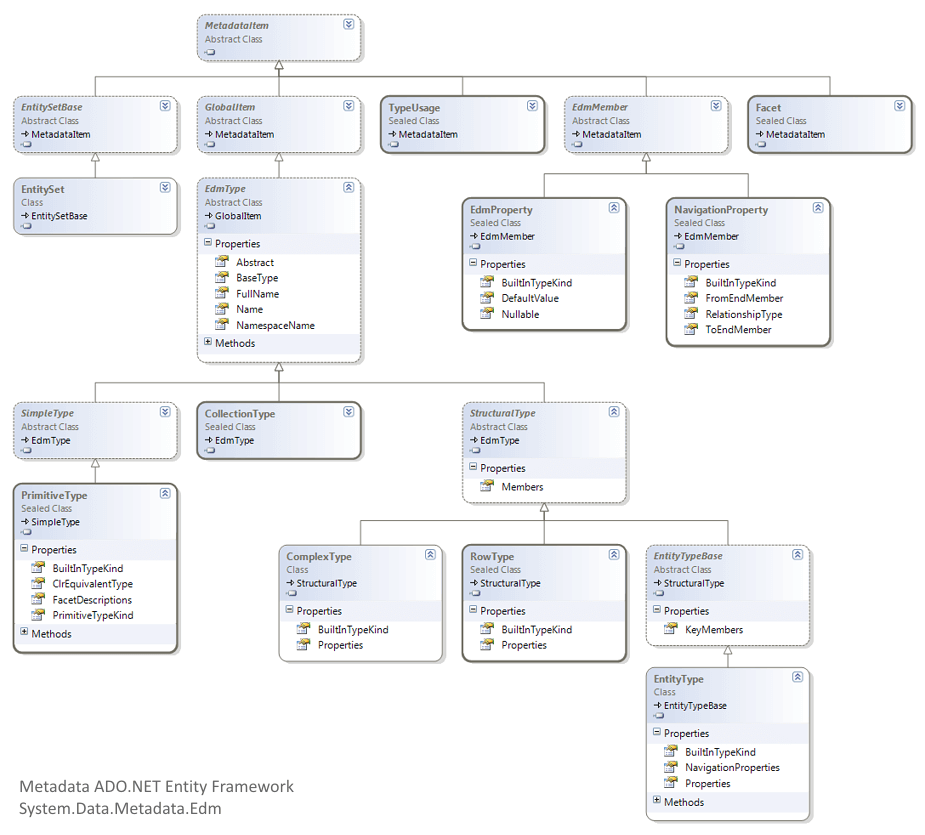
Following class diagram shows all the metadata classes which will be utilized in my examples:
Conceptual schema: MetadataWorkspace.GetItems
The MetadataWorkSpace class aggregates metadata from specific item collections like the conceptual (CSpace), mapping (OCSpace) and storage (CSSpace) model. There are 2 methods which can be called to get this metadata; namely GetItems() and GetEntityContainer().
All examples in this article will use the entities of the Northwind database.
Example 1 : EntityTypes
The following example shows a LINQ to Objects query which queries the conceptual model (CSpace) and displays all the entity names. Notice how you have to typecast the items to an EntityType.
var query = from meta in context.MetadataWorkspace.GetItems(DataSpace.CSpace)
            where meta.BuiltInTypeKind == BuiltInTypeKind.EntityType
select (meta as EntityType).Name;| Category |
| Customer |
| Employee |
| OrderDetail |
| Order |
| Product |
| Shipper |
| Supplier |
I am a fervent user of the LINQPad tool so I executed most queries with this tool. The following example demonstrates how to create a context and dump the result of this query in the HTML view of LINQPad. More information about using LINQPad and the Entity Framework can be found in one of my previous articles.
ScipBe.Demo.EntityFramework.Northwind.NorthwindEntities context =
  new ScipBe.Demo.EntityFramework.Northwind.NorthwindEntities(
    @"Provider=
    System.Data.SqlClient;
    Provider Connection String=
    'Data Source=localhost; Initial Catalog=Northwind;
    Integrated Security=True; Connection Timeout=5; MultipleActiveResultSets=true;';
    Metadata=res://*/");

var query = from meta in context.MetadataWorkspace.GetItems(DataSpace.CSpace)
            where meta.BuiltInTypeKind == BuiltInTypeKind.EntityType
            select (meta as EntityType).Name;

query.Dump();
Example 2 : Inherited EntityTypes
You can also check inheritance and query the EntityTypes which are derived from a base class.
var query = from meta in context.MetadataWorkspace.GetItems(DataSpace.CSpace)
              .Where(m => m.BuiltInTypeKind == BuiltInTypeKind.EntityType)
            let m = (meta as EntityType)
            where m.BaseType != null
            select new
            {
              m.Name,
              BaseTypeName = m.BaseType != null ? m.BaseType.Name : null,
};| Name | BaseTypeName |
|---|---|
| USAEmployee | Employee |
| UKEmployee | Employee |
| DiscontinuedProduct | Product |
Example 3 : EntityTypes and Properties
The following query will aggregate all properties and some of their characteristics like Nullable, DefaultValue and Documentation.
var query = from meta in context.MetadataWorkspace.GetItems(DataSpace.CSpace)
              .Where(m => m.BuiltInTypeKind == BuiltInTypeKind.EntityType)
            let m = (meta as EntityType)
            let properties = m.Properties
            select new
            {
              EntityName = m.Name,
              MembersCount = m.Members.Count,
              KeyMembersCount = m.KeyMembers.Count,
              PropertyNames = from p in properties
                              select new
                              {
                                p.Name,
                                p.Nullable,
                                p.DefaultValue,
                                Documentation = p.Documentation != null ?
                                  p.Documentation.LongDescription : null,
                                Type = p.TypeUsage.EdmType.Name
                              }
}; | EntityName | MembersCount | KeyMembersCount | PropertyNames | ||||||||||||||||||||||||||||||||||||||||||||||||
|---|---|---|---|---|---|---|---|---|---|---|---|---|---|---|---|---|---|---|---|---|---|---|---|---|---|---|---|---|---|---|---|---|---|---|---|---|---|---|---|---|---|---|---|---|---|---|---|---|---|---|---|
| Category | 5 | 1 |
|
||||||||||||||||||||||||||||||||||||||||||||||||
| Customer | 12 | 1 |
|
Example 4 : Properties
Let us flatten the result.
var query = from meta in context.MetadataWorkspace.GetItems(DataSpace.CSpace)
              .Where(m => m.BuiltInTypeKind == BuiltInTypeKind.EntityType)
            from p in (meta as EntityType).Properties
            select new
            {
              EntityTypeName = p.DeclaringType.Name,
              PropertyName = p.Name,
              Nullable = p.Nullable,
              TypeUsageName = p.TypeUsage.EdmType.Name,
              DefaultValue = p.DefaultValue,
              Documentation = p.Documentation != null ? p.Documentation.LongDescription : null,
              Type = p.TypeUsage.EdmType.Name
}; | EntityTypeName | PropertyName | Nullable | TypeUsageName | DefaultValue | Documentation |
|---|---|---|---|---|---|
| Category | CategoryID | False | Int32 | null | Primary key |
| Category | CategoryName | False | String | null | Name of product category |
| Category | Description | True | String | null | Description of product category |
| Category | Picture | True | Binary | null | Binary field with picture of category |
| Customer | Address | True | String | null | null |
| Customer | City | True | String | LOMMEL | null |
| Customer | CompanyName | False | String | null | null |
| Customer | Country | True | String | BELGIUM | null |
| Employee | Address | True | String | Torenstraat | Address long description |
| Employee | Country | True | String | null | null |
| Employee | EmployeeID | False | Int32 | null | null |
| OrderDetail | Discount | False | Single | null | null |
| OrderDetail | OrderID | False | Int32 | null | null |
| Order | ShipPostalCode | True | String | null | null |
| Order | ShipRegion | True | String | null | null |
| Product | Discontinued | False | Boolean | null | null |
| Product | ProductID | False | Int32 | null | null |
| Supplier | Region | True | String | null | null |
| Supplier | SupplierID | False | Int32 | null | null |
Example 5 : Properties
Now we have a simple collection with all info about the properties. It is quite easy to query this collection again. e.g. We like to know which string properties are not nullable.
var properties = from meta in context.MetadataWorkspace.GetItems(DataSpace.CSpace)
                   .Where(m => m.BuiltInTypeKind == BuiltInTypeKind.EntityType)
                 from p in (meta as EntityType).Properties
                 select new
                 {
                   EntityTypeName = p.DeclaringType.Name,
                   PropertyName = p.Name,
                   Nullable = p.Nullable,
                   TypeUsageName = p.TypeUsage.EdmType.Name,
                   DefaultValue = p.DefaultValue,
                   Documentation = p.Documentation != null ? p.Documentation.LongDescription : null
                 };

var query = from p in properties
            where p.Nullable == false
              && p.TypeUsageName == "String"
select p;| EntityTypeName | PropertyName | Nullable | TypeUsageName | DefaultValue | Documentation |
|---|---|---|---|---|---|
| Category | CategoryName | False | String | null | Name of product category |
| Customer | CompanyName | False | String | null | null |
| Customer | CustomerID | False | String | null | null |
| Employee | FirstName | False | String | Stefan | Firstname of Employee |
| Employee | LastName | False | String | null | null |
| Product | ProductName | False | String | null | null |
| Shipper | CompanyName | False | String | null | null |
| Supplier | CompanyName | False | String | null | null |
Example 6 : Properties
This data can also be used to create statistics. The following example will show how many properties of each (primitive) type are defined in our Entity Data Model.
var properties = from meta in context.MetadataWorkspace.GetItems(DataSpace.CSpace)
                   .Where(m => m.BuiltInTypeKind == BuiltInTypeKind.EntityType)
                 from p in (meta as EntityType).Properties
                 select new
                 {
                   EntityTypeName = p.DeclaringType.Name,
                   PropertyName = p.Name,
                   Nullable = p.Nullable,
                   TypeUsageName = p.TypeUsage.EdmType.Name,
                   DefaultValue = p.DefaultValue,
                   Documentation = p.Documentation != null ? p.Documentation.LongDescription : null
                 };

var query = (from p in properties
             group p by p.TypeUsageName into gr
select new { Type = gr.Key, Count = gr.Count() }).OrderByDescending(t => t.Count);| Type | Count |
|---|---|
| String | 47 |
| Int32 | 8 |
| DateTime | 5 |
| Int16 | 4 |
| Decimal | 3 |
| Binary | 2 |
| Single | 1 |
| Boolean | 1 |
Example 7 : NavigationProperties
The collection of metadata of each entity also contains info about its navigation properties (=relations). Let us create a query that can be used to generate C# code for defining constants for the navigation property names. Maybe this can be used in a pre-build event.
var query = from meta in context.MetadataWorkspace.GetItems(DataSpace.CSpace)
              .Where(m => m.BuiltInTypeKind == BuiltInTypeKind.EntityType)
            from p in (meta as EntityType).NavigationProperties
            orderby p.DeclaringType.Name, p.Name
            select new
            {
              NavigationPropertyConstantName = "const string " + p.DeclaringType.Name + p.Name
                + " = " + "\"" + p.Name + "\";"
};| NavigationPropertyConstantName |
|---|
| const string CategoryProducts = "Products"; |
| const string CustomerOrders = "Orders"; |
| const string EmployeeBoss = "Boss"; |
| const string EmployeeEmployees = "Employees"; |
| const string EmployeeOrders = "Orders"; |
| const string OrderCustomer = "Customer"; |
| const string OrderEmployee = "Employee"; |
| const string OrderOrderDetails = "OrderDetails"; |
| const string OrderShipper = "Shipper"; |
| const string OrderDetailOrder = "Order"; |
| const string OrderDetailProduct = "Product"; |
| const string ProductCategory = "Category"; |
| const string ProductOrderDetails = "OrderDetails"; |
| const string ProductSupplier = "Supplier"; |
| const string ShipperOrders = "Orders"; |
| const string SupplierProducts = "Products"; |
Example 8 : NavigationProperties
Maybe we are interested in all EntityTypes which have self-referencing relations.
var query = from meta in context.MetadataWorkspace.GetItems(DataSpace.CSpace)
              .Where(m => m.BuiltInTypeKind == BuiltInTypeKind.EntityType)
            from p in (meta as EntityType).NavigationProperties
            where p.ToEndMember.TypeUsage.EdmType.FullName == "Transient.reference["
                + p.DeclaringType.FullName + "]"
            select new
            {
              EntityTypeName = p.DeclaringType.Name,
              NavigationPropertyName = p.Name,
              FromEndMemberName = p.FromEndMember.Name,
              FromEndMemberMultiplicity = p.FromEndMember.RelationshipMultiplicity,
              ToEndMemberName = p.ToEndMember.Name,
              ToEndMemberMultiplicity = p.ToEndMember.RelationshipMultiplicity
};| EntityTypeName | NavigationPropertyName | FromEndMemberName | FromEndMemberMultiplicity | ToEndMemberName | ToEndMemberMultiplicity |
|---|---|---|---|---|---|
| Employee | Employees | Boss | ZeroOrOne | Employees | Many |
| Employee | Boss | Employees | Many | Boss | ZeroOrOne |
Conceptual schema: MetadataWorkspace.GetEntityContainer
The GetItems() method will return a collection with info about EntityTypes. A higher level in the metadata hierarchy are EntitySets. To get this information you need to call the GetEntityContainer() method which returns an EntityContainer object. This class has a property BaseEntitySets which is a collection of EntitySets.
Example 9 : EntitySets and EntityTypes
The example shown below displays the EntitySet names and their corresponding EntityType names.
var container = context.MetadataWorkspace.GetEntityContainer(context.DefaultContainerName, DataSpace.CSpace);
var query = from meta in container.BaseEntitySets
            where meta.BuiltInTypeKind == BuiltInTypeKind.EntitySet
select new { EntitySetName = meta.Name, EntityTypeName = meta.ElementType.Name };| EntitySetName | EntityTypeName |
|---|---|
| Categories | Category |
| Customers | Customer |
| Employees | Employee |
| OrderDetails | OrderDetail |
| Orders | Order |
| Products | Product |
| Shippers | Shipper |
| Suppliers | Supplier |
Example 10 : GetEntitySetName
Knowing this you can create a function which returns the EntitySet name when a EntityType name is given. E.g. when we pass "Category" the return value will be "Categories".
public static string GetEntitySetName(ObjectContext context, string entityTypeName)
{
  var container = context.MetadataWorkspace.GetEntityContainer(context.DefaultContainerName, DataSpace.CSpace);
  string entitySetName = (from meta in container.BaseEntitySets
                          where meta.ElementType.Name == entityTypeName
                          select meta.Name).FirstOrDefault();
  return entitySetName;
}
Example 11 : GetEntityTypeName
And of course it is easy to implement the reverse function.
public static string GetEntityTypeName(ObjectContext context, string entitySetName)
{
  var container = context.MetadataWorkspace.GetEntityContainer(context.DefaultContainerName, DataSpace.CSpace);
  string entityTypeName = (from meta in container.BaseEntitySets
                           where meta.Name == entitySetName
                           select meta.ElementType.Name).FirstOrDefault();
  return entityTypeName;
}
Example 12 : GetEntityTypeName
An EntityContainer also provides a GetEntitySetByName() method which will do the same as example 10.
var container = context.MetadataWorkspace.GetEntityContainer(context.DefaultContainerName, DataSpace.CSpace);
var entityTypeName = container.GetEntitySetByName("Employees", true).ElementType.Name;
Update January 2009 : Check out this newer article for extension methods to get the Entity type or set names.
Conceptual schema: ObjectQuery.GetResultType
EntitySet
The ObjectQuery class provides a very useful GetResultType() method which returns a detailed hierarchical structure about the metadata of an EntitySet, Entity-SQL query or LINQ to Entities query.
Example 13
The following example shows a screenshot with the metadata which is returned by the GetResultType() method. As you can see this structure is quite complex and contains a lot of detailed information about facets, members, keymembers, navigationproperties, ...
var query = context.Employees.GetResultType();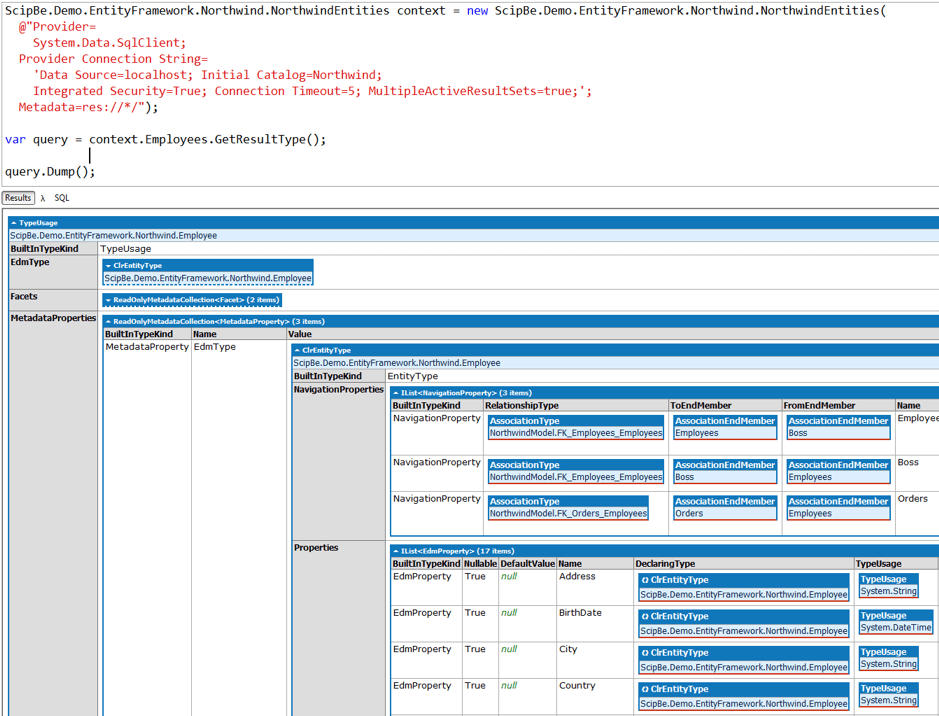
Example 14 : Members
In most cases you only need some basic metadata information like propertynames, nullable (required) and datatype. The following query will return basic information about the Members. Notice that you need to typecast a number of properties.
var members = context.Employees.GetResultType().EdmType.
  MetadataProperties.First(p => p.Name == "Members").Value as IEnumerable<EdmMember>;

var query = from meta in members
            let prop = (meta as EdmProperty)
            let type = meta is EdmProperty ? (meta as EdmProperty).TypeUsage.EdmType : null
            where meta is EdmProperty
            select new
            {
              Name = prop.Name,
              Nullable = prop.Nullable,
              Type = type.Name
};| Name | Nullable | Type |
|---|---|---|
| Address | True | String |
| BirthDate | True | DateTime |
| City | True | String |
| Country | True | String |
| EmployeeID | False | Int32 |
| Extension | True | String |
| FirstName | False | String |
| HireDate | True | DateTime |
| HomePhone | True | String |
| LastName | False | String |
| Notes | True | String |
| Photo | True | Byte[] |
| PhotoPath | True | String |
| PostalCode | True | String |
| Region | True | String |
| Title | True | String |
| TitleOfCourtesy | True | String |
Example 15 : KeyMembers
An EdmType also provides a KeyMembers collection. This query will return the key members and their datatype.
var members = context.Employees.GetResultType().EdmType.
  MetadataProperties.First(p => p.Name == "KeyMembers").Value as IEnumerable<EdmMember>;

var query = from meta in members
            let prop = (meta as EdmProperty)
            let type = meta is EdmProperty ? (meta as EdmProperty).TypeUsage.EdmType : null
            where meta is EdmProperty
            select new
            {
              Name = prop.Name,
              Type = type.Name
};| Name | Type |
|---|---|
| EmployeeID | Int32 |
LINQ to Entities query
The same LINQ query can be used to aggregate some metadata of a LINQ to Entities query.
Example 16 : Members
var employees = from e in context.Employees
                where e.Country == "USA"
                select new { e.EmployeeID, FullName = e.FirstName + " " + e.LastName, e.City };

var members = (employees as ObjectQuery).GetResultType().EdmType.
  MetadataProperties.First(p => p.Name == "Members").Value as IEnumerable<EdmMember>;

var query = from meta in members
            let prop = (meta as EdmProperty)
            let type = meta is EdmProperty ? (meta as EdmProperty).TypeUsage.EdmType : null
            where meta is EdmProperty
            select new
            {
              Name = prop.Name,
              Nullable = prop.Nullable,
              Type = type.Name
};| Name | Nullable | Type |
|---|---|---|
| EmployeeID | True | Int32 |
| FullName | True | String |
| City | True | String |
ToMetadata() extension method
I started creating a ToMetadata() LINQ extension method that combines the data of members and keymembers into a new simple hierarchical structure with only basic information. There are times when you want to create dynamic UI's because dynamically created queries are being executed. The goal of my ToMetadata() extension method is to simplify the way to get basic metadata.
A future article on my website will demonstrate the purpose and implementation of this extension method.
Update January 2009 : Check out this newer article for the full ToMetadata extension method
Example 17 : ToMetadata
var query = context.Employees.ToMetadata();| BuildInTypeKind | EntityType | ||||||||||||||||||||||||||||||||||||||||||||||||||||||||||||||||||
|---|---|---|---|---|---|---|---|---|---|---|---|---|---|---|---|---|---|---|---|---|---|---|---|---|---|---|---|---|---|---|---|---|---|---|---|---|---|---|---|---|---|---|---|---|---|---|---|---|---|---|---|---|---|---|---|---|---|---|---|---|---|---|---|---|---|---|---|
| Properties |
|
||||||||||||||||||||||||||||||||||||||||||||||||||||||||||||||||||
| NavigationProperties |
|
Storage schema: MetadataWorkspace.GetItems
The GetItems() method of the MetadataWorkSpace class can also be used to get metadata from the storage model (CSSpace). There is one important issue; the storage scheme information is not loaded after instantiating the context. So you have to retrieve some data, e.g. with a dummy query, to force the context to load the storage schema information.
The examples shown below are almost the same as example 1 and 2 but these will display metadata about the tables and fields in your database.
Example 18 : Table names
// Force context to load storage schema information
var name = context.Employees.First().LastName;

var query = from meta in context.MetadataWorkspace.GetItems(DataSpace.SSpace)
            where meta.BuiltInTypeKind == BuiltInTypeKind.EntityType
select (meta as EntityType).Name; | Categories |
| Customers |
| Employees |
| Order Details |
| Orders |
| Products |
| Shippers |
| Suppliers |
Example 19 : Table and field names
The metadata about the datatypes in the storage schema are not the .NET types like string, integer, bool,... but they are the datatypes supported by the database such as nvarchar, nchar, ntext, int, ...
var query = from meta in context.MetadataWorkspace.GetItems(DataSpace.SSpace)
              .Where(m => m.BuiltInTypeKind == BuiltInTypeKind.EntityType)
            let properties = meta is EntityType ? (meta as EntityType).Properties : null
            select new
            {
              TableName = (meta as EntityType).Name,
              Fields = from p in properties
                       select new
                       {
                         FielName = p.Name,
                         DbType = p.TypeUsage.EdmType.Name
                       }
};| TableName | Fields | ||||||||||||||||||||||||
|---|---|---|---|---|---|---|---|---|---|---|---|---|---|---|---|---|---|---|---|---|---|---|---|---|---|
| Categories |
|
||||||||||||||||||||||||
| Customers |
|
Example 20 : Fields
After flattening this query we can easily check which int fields are required.
var query = from meta in context.MetadataWorkspace.GetItems(DataSpace.SSpace)
              .Where(m => m.BuiltInTypeKind == BuiltInTypeKind.EntityType)
            from p in (meta as EntityType).Properties
            where p.Nullable == false
              && p.TypeUsage.EdmType.Name == "int"
            select new
            {
              TableName = p.DeclaringType.Name,
              FieldName = p.Name,
              DbType = p.TypeUsage.EdmType.Name,
              p.Nullable
};| TableName | FieldName | DbType | Nullable |
|---|---|---|---|
| Categories | CategoryID | int | False |
| Employees | EmployeeID | int | False |
| Order Details | OrderID | int | False |
| Order Details | ProductID | int | False |
| Orders | OrderID | int | False |
| Products | ProductID | int | False |
| Shippers | ShipperID | int | False |
| Suppliers | SupplierID | int | False |
Example 21 : Stored procedures
It is also possible to get all the stored procedures by querying the EdmFunctions. Make sure to add an extra where clause for the "SqlServer" namespace to avoid that this query will also return the Min, Max, Count, Upper, Left, ... functions.
It was also looking for a way to find the mapping information about the stored procedures in the conceptual schema but I couldn' find it. Afterwards Danny Simmons from Microsoft confirmed me that the mapping metadata about stored procedures isn't available publically in version 1.0 of the Entity Framework.
var query = from meta in context.MetadataWorkspace.GetItems(DataSpace.SSpace)
              .Where(m => m.BuiltInTypeKind == BuiltInTypeKind.EdmFunction)
            let m = (meta as EdmFunction)
            where m.NamespaceName != "SqlServer"
            select new
            {
              m.Name,
              ReturnParameter = m.ReturnParameter != null ?
                new { m.ReturnParameter.Name, Type = m.ReturnParameter.TypeUsage.EdmType.Name } : null,
              Parameters = m.Parameters.Select(p => new { p.Name, Type = p.TypeUsage.EdmType.Name })
};| Name | ReturnParameter | Parameters | ||||||
|---|---|---|---|---|---|---|---|---|
CustOrderHist |
null |
|
||||||
CustOrdersOrders |
null |
|
||||||
SalesByCategory |
null |
|
Storage schema: EntityStoreSchemaGenerator.CreateStoreSchemaConnection
Finally I would like give an alternative technique to query the storage schema. This example will use a EntityStoreSchemaGenerator, an EntityCommand and a EntityDataReader. Of course I prefer the previous techniques which are much easier.
Example 22 : Table and field names
// Get connection string from the configuration
ConnectionStringSettings connSettings = ConfigurationManager.ConnectionStrings["NorthwindEntities"];
EntityConnectionStringBuilder entityConnectionStringBuilder =
  new EntityConnectionStringBuilder(connSettings.ConnectionString);

// Create connection to storage schema
EntityConnection schemaConnection = EntityStoreSchemaGenerator.CreateStoreSchemaConnection(
  entityConnectionStringBuilder.Provider, entityConnectionStringBuilder.ProviderConnectionString);

schemaConnection.Open();

// Entity SQL query on storage schema connection
EntityCommand command = new EntityCommand(
                     "SELECT c.Parent.Name as TableName, c.Name as ColumnName, c.IsNullable " +
                     " FROM SchemaInformation.TableColumns AS c" +
                     " ORDER BY TableName, ColumnName",
                     schemaConnection);

// Use EntityDataReader to access metadata sequential
using (EntityDataReader reader = command.ExecuteReader(CommandBehavior.SequentialAccess))
{
  while (reader.Read())
  {
    string rowData = "";
    for (int col = 0; col < reader.FieldCount; col++)
    {
      rowData += reader.GetValue(col).ToString() + "\t| ";
    }
    Console.WriteLine(rowData);
  }
  reader.Close();
}
schemaConnection.Close();
Mapping schema
I have also been trying to query the mapping metadata. I wanted to find the metadata which describes how tables and entities are mapped and which stored procedures are mapped to entities. I was not able to find the metadata I needed via the MetadataWorkSpace. Afterwards Danny Simmons from Microsoft did let me know that this mapping metadata is not available publically and that it is something they have to do in a future release of the Entity Framework.
I hope that the above examples are useful and provide a good overview of some metadata querying techniques. In a future article I will describe the details about my ToMetadata() extension method. If you have any questions, suggestions or comments be sure to let me know.